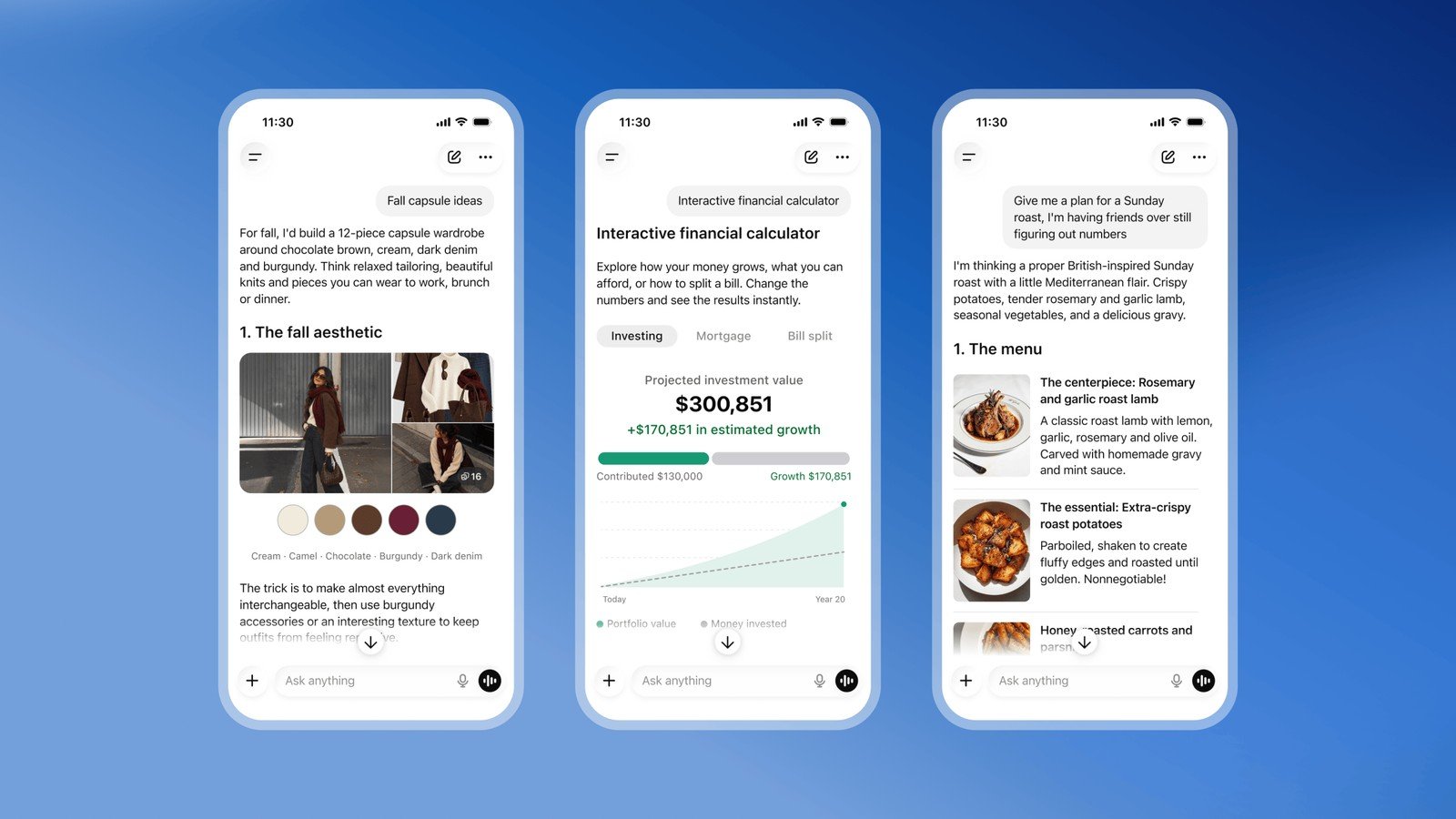
OpenAI is rolling GPT-6 into everyday ChatGPT Chat, with a new response style it calls Intelligent UI. Instead of always answering as a wall of text, the model can compose replies from text, graphics, charts, forms, tappable buttons, and small interactive tools generated inside the conversation. Paid Chat tiers get GPT-6 Sol; Free and Go get GPT-6 Luna, both described as tuned for everyday chat. Work and Codex model stacks are unchanged in this release.
This is a Chat surface ship, not a new API frontier drop. OpenAI’s speed and search numbers below are company-reported. 9to6AI has not hands-on tested Intelligent UI.
Image credit: OpenAI
Key points
- What shipped: GPT-6 in ChatGPT Chat with Intelligent UI — native, streamable UI components the model can arrange per question (diagrams, side-by-side comparisons, forms, calculators, simple games).
- Who gets which model (per launch post): GPT-6 Sol for Plus, Pro, Business, and Enterprise Chat; GPT-6 Luna for Free and Go. Enterprise still depends on admin settings.
- Where it runs: Chat tab on web and supported updated mobile apps. Help Center: not on older ChatGPT desktop apps for macOS/Windows; use the web app. Not available at Pro effort (that path stays on GPT-6 Astra / GPT-6 Pro).
- Also claimed: answers can start while the model keeps thinking; web-search answers start 44% sooner on average for GPT-6 Instant vs GPT-5.6 Instant (OpenAI internal comparison).
- Scope limits: no separate Intelligent UI quota; existing plan/tool limits still apply. Settings → Layout and visuals can reduce visual chrome on web (not a full text-only mode).
- Caveats: Free/Go naming in Help still mixes GPT-5.6 Luna language in places — check the model menu on your account. Vendor evals only. Interactive UI quality will vary by prompt; text-only remains allowed when the model judges it clearer.
What shipped
OpenAI framed last month’s GPT-6 wave as paid-first. This update pushes everyday GPT-6 into the main Chat experience for a much wider audience, and pairs it with a UI compiler stacked on a component library so interfaces can stream in as the model generates them.
| Field | Value (vendor) |
|---|---|
| Feature | Intelligent UI in ChatGPT Chat |
| Models named | GPT-6 Sol (paid Chat tiers) · GPT-6 Luna (Free / Go) |
| Surfaces in this release | Chat tab — web + updated mobile |
| Explicitly unchanged | Work and Codex model powering for this drop |
| Opt-down | Web Settings → Layout and visuals |
| Desktop caveat | Older macOS/Windows ChatGPT desktop apps unsupported for these capabilities |
Examples OpenAI highlights: interactive bicycle-system diagrams, Mahjong tile teaching layouts, Sunday-roast planners with adjustable guest counts, savings calculators, bill splitters, and small in-chat games. The model is trained to choose layout and interactivity — including when plain text is enough.
What changed for Chat users
1. Answers can be software, not only prose.
Comparisons can land side by side. Explanations can become navigable diagrams. Task prompts can produce a mini-tool instead of a recipe you have to copy into a spreadsheet. That is the product bet: ChatGPT stops forcing every job into the same chat bubble shape.
2. Latency packaging changes.
OpenAI says GPT-6 can interleave thinking with answering — start a useful partial reply, then add detail — instead of waiting for a full reasoning pass. On web-search questions, it claims GPT-6 Instant begins answering 44% sooner than GPT-5.6 Instant on average. Treat that as a vendor latency story, not a guarantee on your network or prompt mix.
3. Safety and honesty claims ride along.
The launch post says GPT-6 builds on Astra-era safety work: stronger resistance to multi-turn jailbreaks in adversarial tests, clearer communication of capability limits, and updated training against high-risk misuse classes. Those are OpenAI’s eval claims; independent red-team results are not in this article.
4. Plan and surface gotchas matter more than the demo reel.
Help Center is explicit that Intelligent UI rides GPT-6 Instant through Extra High effort, not Pro effort. Older desktop clients are out. Managed workspaces may gate models. If you do not see GPT-6 yet, the Help article’s advice is still the right first check: rollout timing plus admin permissions.
What it means for builders
1. This is a ChatGPT Chat UX release — do not confuse it with GPT-6.1 Sol / Astra API work.
If your stack is Responses API, Codex, or ChatGPT Work agents, this drop does not swap those backends. We already covered GPT-6.1 Sol as the mid-tier Work/Codex/API story. Intelligent UI is about how Chat presents answers to people.
2. Design for “UI may appear” in support docs and training.
Support teams and internal enablement should assume screenshots will include charts, tabs, and generated widgets. Teach users the Layout and visuals toggle, and that Pro effort stays on a different path without this UI mode.
3. Prompt patterns shift toward tasks, not only questions.
“Build me a bill splitter for six people with tip” is now a first-class Chat prompt shape. Product and growth teams can test whether interactive answers reduce follow-ups versus long markdown tables — measure on your own traffic; we are not inventing conversion lifts.
4. Accessibility and trust need a human pass.
Streamed custom UIs can help clarity or bury it. Watch contrast, keyboard use, mobile overflow, and whether interactive charts invent precision the underlying answer does not earn. OpenAI says design judgment is still improving; that matches what builders should expect on day one.
5. Competitive context, not a monopoly.
Anthropic Artifacts, Google Canvas-style surfaces, and other “answer as app” experiments have been moving the same direction. Intelligent UI’s distinction is OpenAI tying it to a GPT-6 Chat rollout aimed at Free through Enterprise, with a stated path to more adaptive software over fixed menus. The long-term claim is ambitious; the ship today is Chat composing from a constrained component library.
What to watch
- Whether Free/Go accounts show GPT-6 Luna cleanly in the model menu, or Help-center GPT-5.6 Luna wording persists during rollout.
- How often Intelligent UI fires on messy real prompts versus polished demos.
- Enterprise admin defaults — model access, Layout settings, and audit expectations when answers include generated tools.
- Whether OpenAI expands the component library toward deeper apps, or keeps it to charts/forms/widgets.
- Independent latency and quality comparisons versus GPT-5.6 Instant on the same web-search and planning tasks.