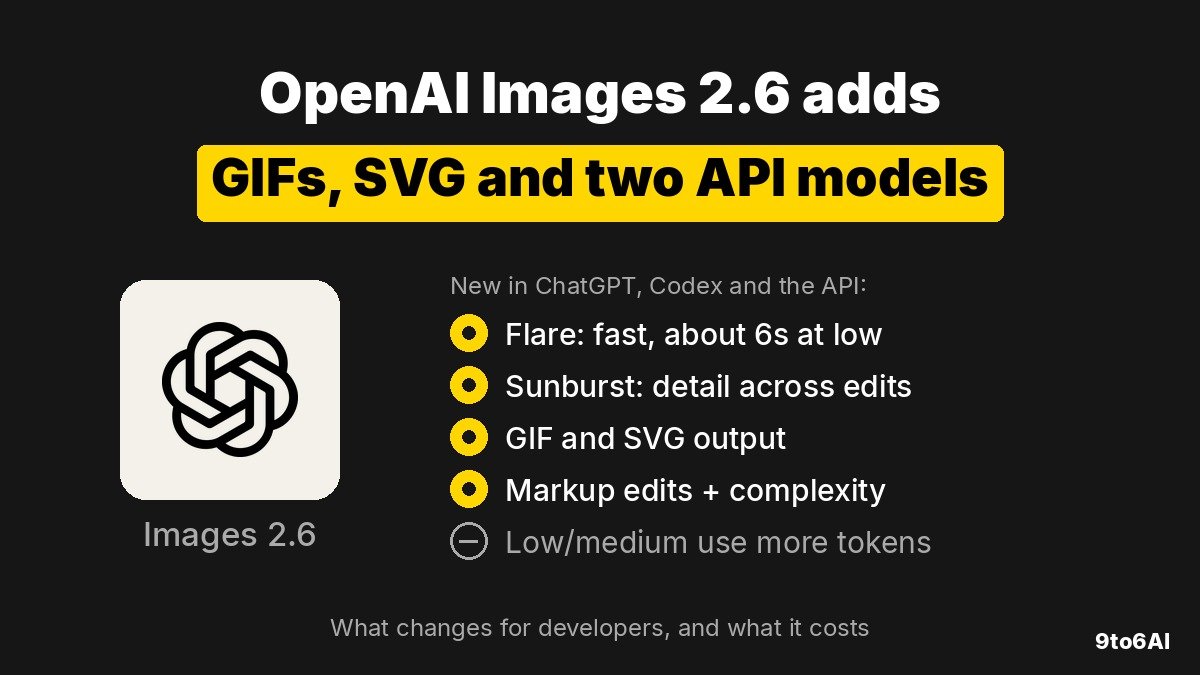
OpenAI’s Images 2.6 is a new version of its image model for ChatGPT, Codex and the API. It is faster, it can make animated GIFs and SVG files, and it adds a setting that controls how much the model plans before it draws. Developers get two models, GPT-Image-2.6 Flare for speed and GPT-Image-2.6 Sunburst for detail. Both cost the same per token, but early tests suggest low and medium quality images now use more tokens than before.
Key points
- Images 2.6 is live in ChatGPT and Codex on all subscription tiers, on desktop, mobile and web, and in the API as
gpt-image-2.6-flareandgpt-image-2.6-sunburst. - OpenAI says it generates images 50% faster than before. Flare can return an image in about six seconds at low quality.
- New in the API: animated GIF output, SVG output, markup-guided edits and a
complexitysetting (low, medium or high). - The token prices have not changed. Developers on Hacker News who checked OpenAI’s pricing calculator say a low or medium quality square image now uses about three to four times as many output tokens as it did on 2.5.
- OpenAI says people now create 4 billion images per week across ChatGPT, Codex and the API.
What did OpenAI ship in Images 2.6?
For ChatGPT users, the most visible change is motion. You can ask for a looping GIF of a mascot, a reaction or a product shot, or start from a rough sketch and turn it into an animated character. OpenAI also says edits are more precise, so characters, products and brand details should stay consistent across rounds of changes.
For developers, the release adds two models and four controls. Image markup, which already existed in ChatGPT, now works in the API, so you can circle the part of an image you want changed. SVG export produces vector files you can use on websites, in apps and in print. The new complexity setting decides how much planning goes into a scene, separately from rendering quality.
OpenAI named three early users. OpenArt is using it for GIF creation, Figma Weave is adding it to its creative workflow tool, and Town, a startup building an AI work assistant, tried animated characters through the API. OpenAI has also published a system card covering its safety evaluations for the model.
Flare or Sunburst: which model should you use?
OpenAI positions the two models as different jobs, not different price tiers. They share one rate card and the same endpoints, v1/images/generations and v1/images/edits.
| GPT-Image-2.6 Flare | GPT-Image-2.6 Sunburst | |
|---|---|---|
| Built for | Fast iteration and interactive editing | Detailed compositions and editing workflows |
| OpenAI’s claim | As fast as about six seconds at low quality; better layout for posters and product images | Higher quality and better consistency across edits at medium or high quality |
| GIF, SVG, markup, complexity | Yes | Yes |
| Text input price | $5 per 1M tokens ($1.25 cached) | $5 per 1M tokens ($1.25 cached) |
| Image input price | $8 per 1M tokens ($2 cached) | $8 per 1M tokens ($2 cached) |
| Image output price | $30 per 1M tokens | $30 per 1M tokens |
A simple rule: use Flare for previews, drafts, thumbnails and anything a user waits for. Use Sunburst when the same character or product has to survive many edits, such as a brand asset pipeline. Test both on your real prompts. One developer who runs a prompt-to-design site said on Hacker News that he rolled his product back from 2.6 Flare to 2.5 Flare after an hour, because the new outputs were too simple or broken for UI design work. A Design Arena post cited in the thread suggested the model was post-trained to output less text, which could explain it.
How do the new API controls work?
OpenAI’s image generation guide documents each feature. They all work through the Image API, and most come with limits worth knowing before you build on them.
| Feature | How you use it | Limits |
|---|---|---|
| Complexity | complexity: low, medium or high (default high) |
No extra fee. Higher settings can add latency and unwanted changes |
| Animated GIF | output_format: "gif" with frame_count (2 to 64, default 9) and frame_duration_ms (20 to 2,000, default 200) |
Generations only, not edits. No streaming or partial images |
| SVG | output_format: "svg" with n set to 1 |
Generations only. Static vectors with no scripts, external resources or embedded rasters |
| Markup edits | Send a transparent PNG of your circles or sketches as markup to the edits endpoint |
Same size as the first image, up to 16,777,216 pixels and 50 MB. Cannot be combined with mask |
OpenAI recommends low complexity for most quick edits, such as changing a background or a sign, and medium or high for scenes with many objects, dense text or tight layout rules. Complexity is separate from quality, which still controls render detail and drives the token count.
SVG works in two steps. The API first creates a reference image, whose detail follows your quality setting, and then turns it into vector paths. One early tester reported that SVG requests failed with an error asking for an extra svg.model parameter that the guide does not mention, so expect some rough edges in the first days.
Is Images 2.6 more expensive than 2.5?
The rate card is the same, but the bill may not be. Images are billed by output tokens, and the number of tokens per image depends on size and quality. Developers on Hacker News compared OpenAI’s image pricing calculator for 2.5 and 2.6 at 1024 by 1024 pixels and reported these numbers:
| Quality (1024×1024) | 2.5 output tokens | 2.6 output tokens | Reported cost per image |
|---|---|---|---|
| Low | 196 | 823 | about $0.006 to $0.025 |
| Medium | 439 | 1,449 | about $0.013 to $0.043 |
| High | No change reported | about 1,756 | about $0.053 |
These figures come from users, not from an OpenAI price comparison, so check the calculator for the sizes you actually use. If they hold, a cheap draft image costs roughly four times more on 2.6, while high quality stays about the same. Teams that generate many low quality previews should measure before switching. One option is to keep 2.5 for bulk drafts and use 2.6 where speed, GIFs or SVG matter.
The API may also require you to complete Organization Verification in the developer console before using GPT Image models.
What are early users saying?
The launch reached the Hacker News front page within hours, and the reaction was mixed. Some commenters liked the SVG output and the speed. Others pointed out that asking for a frame grid and turning it into a GIF is an old trick, and that the frames in OpenAI’s own examples still show noise and artifacts. Some still prefer Google’s Nano Banana for photos while rating GPT Image highly for posters and design work.
There were also questions about the Codex rollout. One user said the latest Codex CLI still could not create GIFs, and another pointed to Codex source code that still references an older image model. OpenAI says Images 2.6 is available in Codex, so this may be a staged rollout. If you rely on it in the CLI, check that it actually works first.
What should you watch next?
- Whether OpenAI explains the higher token counts at low and medium quality, or changes them.
- Whether the SVG endpoint documentation catches up with what the API actually requires.
- When Images 2.6 shows up in the Codex CLI for everyone, not only in the ChatGPT and Codex apps.
- Independent comparisons of Flare and Sunburst against Images 2.5 and Google’s image models on text-heavy design work, where early testers saw the biggest differences.