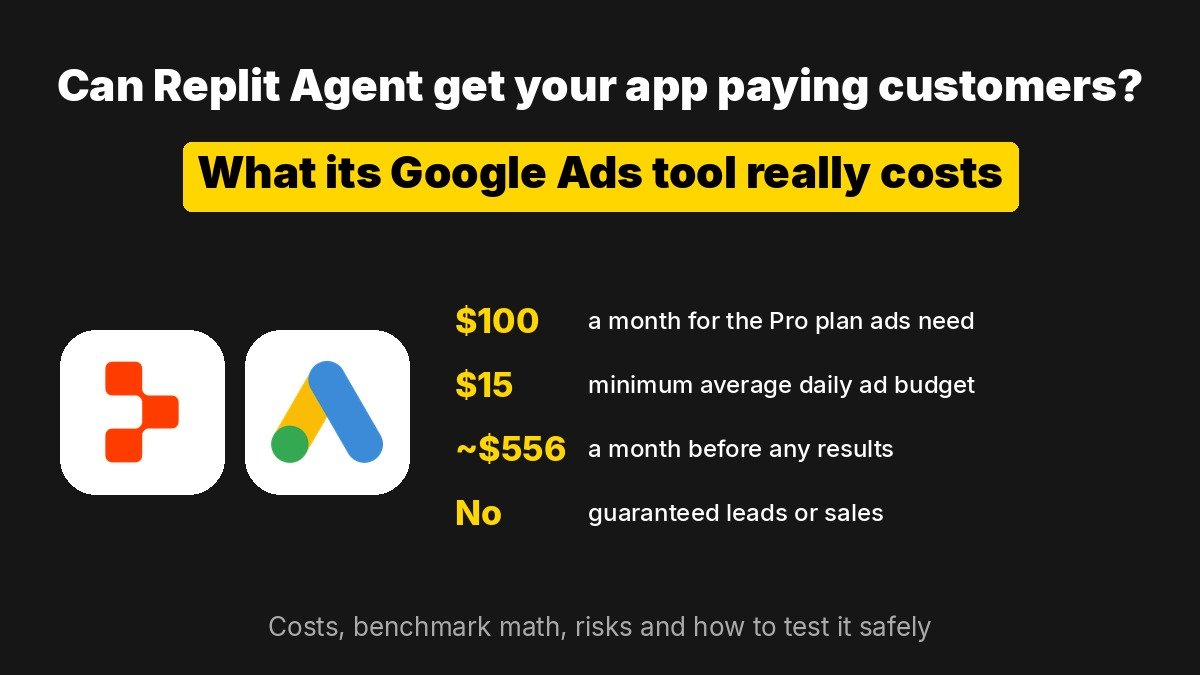
Short answer: With Replit Agent Google Ads, Replit Agent can now build and run ad campaigns for an app you made on Replit, and it can also shop for business supplies with your approval. It can help you find paying customers, but it does not make an app profitable by itself: the floor cost is a $100 a month Pro plan plus at least $15 a day in ad spend, roughly $556 a month before results. It is worth testing only if your app already has a clear paid offer and you know what one customer is worth to you.
Key points
- Replit Agent can now create and run Google Ads Performance Max campaigns for apps published on Replit, after you approve them.
- A Replit managed ads account needs the $100 a month Pro plan, and the minimum average daily ad budget is $15.
- The floor test costs about $556 a month before Agent usage, and Google can spend up to twice the daily average on a single day.
- At public benchmark averages, about $456 of monthly spend buys roughly 84 clicks and 7 leads, not guaranteed sales.
- A separate Agentic Commerce feature buys business supplies through Link and Visa, US only, and you approve every total.
What did Replit launch?
Replit gave Replit Agent two new jobs: running Google Ads and buying what your business needs. The pitch is aimed at what Replit calls a new class of founders who can build an app by describing it but get stuck on finding customers. Replit says the number of entrepreneurs connecting their Replit built businesses to Stripe to take payments has grown ninefold in recent months, and newsletters such as TLDR AI picked up the launch for the same reason: it is one of the first coding agents that also tries to handle the selling side.
- Agentic Ads with Google. Agent reads your published app, drafts headlines, descriptions and images, recommends a daily budget, adds conversion tracking to your code and launches a Performance Max campaign across Search, YouTube, Display and Discover after you approve it.
- Agentic Commerce with Link and Visa. Agent searches merchant sites in an isolated browser, fills the cart and stops at checkout. You approve the final total in Link, Stripe’s wallet, before anything is charged. This part starts in the US only, on Core and Pro plans. It works much like ChatGPT Wallet, where an agent shops and you approve each purchase.
What does Replit Agent Google Ads cost?
The Replit ads documentation says a new Replit managed Google Ads account needs a Pro plan, a personal Workspace, auto reload turned on and a live site or published app. Ad spend comes out of the same credit balance as the rest of your Replit usage.
| Cost item | Amount | Source |
|---|---|---|
| Replit Pro plan (needed for ads) | $100 a month, or $90 a month billed annually | Replit pricing |
| Replit Core plan (enough for the buying feature only) | $20 a month, or $18 a month billed annually | Replit pricing |
| Minimum average daily ad budget | $15 | Replit docs |
| Most Google can spend in one day | Up to 2 times your average daily budget | Google Ads Help |
| Most Google can bill in a month | 30.4 times your average daily budget, about $456 at $15 a day | Google Ads Help |
| Agent work to prepare and manage ads | Billed as normal Replit usage, separate from ad spend | Replit docs |
So a minimum test on monthly billing costs about $556 a month: $100 for Pro plus up to $456 of ad spend, before any Agent usage for building creative and tracking. If you already pay for Pro to host your app, the extra cost is the ad spend.
How many customers could that budget bring in?
Neither Replit nor Google publishes typical results for this feature, so the honest way to judge it is arithmetic with public benchmarks, not a forecast. The WordStream by LocaliQ 2026 benchmarks, based on 13,474 US search campaigns, put the average cost per click at $5.42, the average conversion rate at 8.18% and the average cost per lead at $66.69.
| At the $15 a day minimum | Benchmark math |
|---|---|
| Monthly ad spend (upper limit) | About $456 |
| Clicks at $5.42 each | About 84 |
| Leads at an 8.18% conversion rate | About 7 |
| Cost per lead | About $67, in line with the $66.69 average |
Three caveats matter. These are averages for Search campaigns, while Replit runs Performance Max, which mixes Search with YouTube, Display and Discover placements that often behave differently. A lead is a signup or inquiry, not a sale. And averages hide huge differences between industries.
The useful rule: before launching, write down how much one paying customer is worth to you over their lifetime. If a customer is worth $40 and leads cost around $67 before anyone has paid, the campaign cannot work at any budget until you raise prices, improve the landing page or pick a cheaper niche.
What about Replit’s six figure success stories?
Replit’s announcement features two founders. Jon Cheney says a development shop quoted him $105,000 for an app he then built on Replit in a weekend for under $400, and the business made six figures in its first six weeks. Austin Eckman runs Crafting Table, which sells electronics kits and lessons, and Replit says it brought in $170,000 in 30 days with a return on ad spend of roughly 4 times.
Read those as vendor chosen examples, not typical outcomes. Eckman’s ads engine is one he built himself, not the new Agentic Ads feature, and Replit does not say how many of its users run ads profitably. Its own documentation is blunt: running ads does not guarantee leads, sales or a return on your spend.
Replit managed ads, your own Google Ads account, or free channels?
| Option | Fixed cost | Control | Best for |
|---|---|---|---|
| Replit managed account | Pro plan plus ad spend from Replit credits | Agent drafts everything; one campaign at a time; Performance Max only | Founders who have never run ads and built the app on Replit |
| Connect your existing Google Ads account to Replit | Replit plan; ad spend billed by Google as before | Keeps your own billing and history; Agent still helps with creative and tracking | People who already run Google Ads and want help with setup |
| Run Google Ads yourself | Ad spend only | Full choice of campaign types, keywords and placements | Anyone comfortable with Google Ads who wants tight keyword control |
| Organic channels (communities, SEO, directories, content) | Time instead of money | Full | Unvalidated apps that still need proof people will pay |
How do you test it without burning money?
- Validate the offer first. Get a few paying customers through free channels so you know your price works and what a customer is worth.
- Set up conversion tracking before spending. Ask Agent to track the action that makes money, a purchase or paid signup, and give it a value. Clicks alone tell you nothing.
- Start at the minimum. Use the $15 average daily budget, and remember Google may spend up to $30 on a single day.
- Keep the campaign paused until you review it. Replit can create campaigns paused. Check the destination page, targeting, creative and conversion goal before approving activation.
- Set a fixed test window and stop rule. For example, two to four weeks or a set dollar amount, then pause and compare cost per paying customer with customer value.
- Ask for weekly reports. Reporting routines are not on by default. Ask Agent to set one up for spend, clicks and conversions.
- Confirm the stop. Replit says not to assume a campaign ends by itself. Pause it and ask Agent to confirm the status.
What are the risks?
- The daily budget is not a cap. It is an average. Google can double it on a given day, and Replit notes a Mission budget is not an advertising spending cap either.
- Charges can arrive after you pause. Google reports with a delay, so usage can still show up after a campaign stops.
- Auto reload can keep charging your card. Ads draw from Replit credits, and auto reload is required for a managed account. Review your spend controls before launch.
- Less control than a manual account. Performance Max decides where ads show and which combinations run. Replit managed accounts run one campaign at a time and do not include Google promotional credits.
- The buying agent can make mistakes. The commerce docs warn that payment confirmation and merchant order confirmation are separate, and that retrying an uncertain purchase can create a duplicate charge.
Who should try it, and who should skip it?
Good fit: builders who already pay for Replit Pro, have a live app with a working checkout and a few paying customers, and want a guided first ad test without learning Google Ads from scratch. The built in conversion tracking is the most practical part, because Agent wrote the app and can wire tracking into it directly.
Skip it for now: anyone with an app that has no paying users yet, a free product with no clear upgrade path, or a budget that cannot absorb a few hundred dollars of testing with no return. In those cases, free channels will teach you more per dollar, including free listings such as a ChatGPT business profile. If an AI builder wrote your app, check its database rules before you buy traffic, as the Lovable data exposure showed. The US only buying feature is a convenience for ordering supplies, not a way to earn more.
What should you watch next?
- Real results from users. Independent reports of cost per paying customer from Agent run campaigns will show whether it beats a manual setup.
- More campaign types. Performance Max is the only type at launch. Search only campaigns would give tighter control for niche apps.
- Wider buying availability. Agentic Commerce starts in the US. Watch for other countries and recurring purchases with spending limits.